mmd for linux!?!??!
it's easier than you may think.............
while this should work for most people, there's no guarantee that you won't run into issues. mmd is a fussy program.if you DO run into issues and want help, you can ask in my (mostly dead) discord server
this carrd was created by and is maintained by kyses on deviantarthowever, my partner exelia was the Main Brain behind the scenes. #HellYeahExelia thank u for ur services <3
if you don't have mmd, mme, pmx editor, and wine installed, i would recommend you do that first.
step 1: install bottles
because bottles can't access files outside of its directory, you'll either want to put all of your files in the bottle we create OR change the permissions of bottles with flatseal (which i find more convenient, personally)
2: set up bottles
head to the three dot menu and go to 'Preferences'go to 'Runners' under 'Preferences'select a version of wine that is 10 or higher. you CAN use an older version of wine, but it seems to run the best on the latest versions.
3: create a bottle
click + and give it a name. name it whatever you want. i'm not your mom.select 'Gaming' and change your runner to wine 10 (or higher)it should look like this
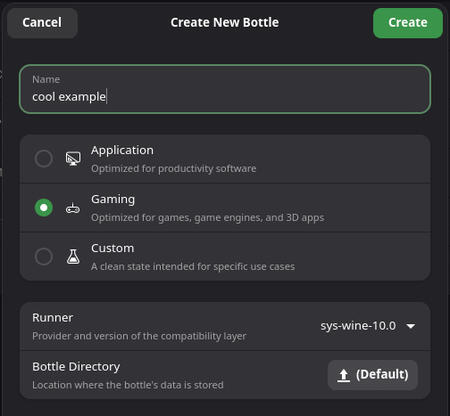
click create. sit and wait for it to work some magic.
4: configure the bottle
head to 'Dependencies' under the 'Options' section
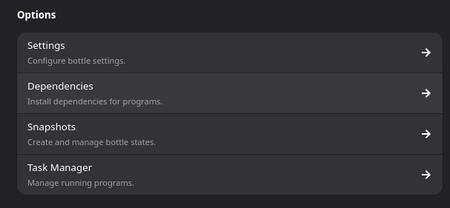
install the following:directshow, gdiplus, vcredist2005, vcredist2008, vcredist2010, cjkfonts
5: change the locale
close bottles, and enter the following into your terminal:flatpak config --set extra-languages ja_JP.UTF-8
followed by:
flatpak updateopen bottles again, and go to the one you created.head to 'Settings' and then 'Environment Variables' (under Compatibility)enter the following and then click on the check mark:
LANG=ja_JP.UTF-8
6: configure mmd
if everything went okay, MMD should be able to launch.once you're in the program, head to Effect Mapping (if you're using MME) and click "Skip Device Validation"
7: woohoo
MMD should be all set. enjoy watching your little guys dance around!
note: if you haven't gone through the steps in the MMD section, head there first!
1: duplicate your MMD bottle
go to your MMD bottleclick on the three dot menu and select 'Duplicate Bottle'call it whatever you want. i'm still not your mom.
2: disable dxvk
go to Settingsfind DXVK and set it to Disabled
3: unset the locale (optional)
since PMX Editor doesn't NEED the japanese locale, you can remove it.head to your duplicated bottlego to Settings and then Environment Variablesremove the LANG=ja_JP.UTF-8
4: installing .net (optional)
this can cause some issues or lag. only follow this step if you're stubborn and hate how it looks or if your PMX Editor crashes/yells at you about memoryhead to your duplicated bottle, and scroll to Legacy Wine Tools. click Uninstaller.find "Wine Mono Runtime", and get that guy out of there. click Remove and then OK.head to Dependencies and install dotnet45
5: woohoo
everything should be set. enjoy editing those little guys.